Editor Business Approval
NOTE: This section is only useful for editing businesses and their team members.
Editor Business Approval
This is the flow to get approved as a Business for services. This can only be done by the business owner, and only approved by Image Edits.
Step 1: Navigate to Editor Business Services
Go to this menu shown below: (if its not visible, it means you are not editor business and/or not the owner of the editing business)

From here you can view your existing business job applications you have applied to, and their current status. You can also update the job applications from here, if you edit the job application, no matter the status, it will go back to requested for Image Edits to review and reapprove your requested change.
Step 3: Create New Job Application
Press the button 'Create Application' in the top right of this section.
You'll see a form to fill out like below:
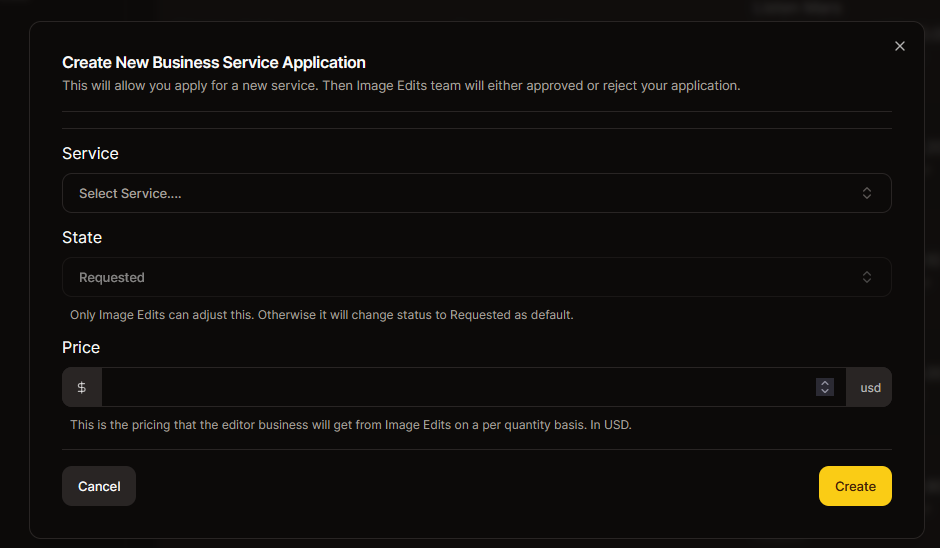
You wont be able to adjust status. It will always be requested for new job applications. Price, set estimated labor costs for each qty, or if your 3rd party, just pick price you are wanting. Service, this will contain a list of services that your business can apply for. You cant apply for same service twice.
Step 4: After Creation
After the job application has been created, you will be redirected back to the job application service list for your business, you should see the new job application you just created. Now you need to wait for Image Edits to review and approve or reject the application.
Once approved, you can then move onto approving your team members for specific services. Which will be mostly the same process but assinging to users instead of editor