Invoices Layout
Explain overall invoices layout and what it means
This section is going to show you the overall layout of the invoices and what each section means. It should be mostly self explanatory.
Invoice Layout
Below is the example of invoice showing its details and layout. The invoice below is a test one, so all fake data.
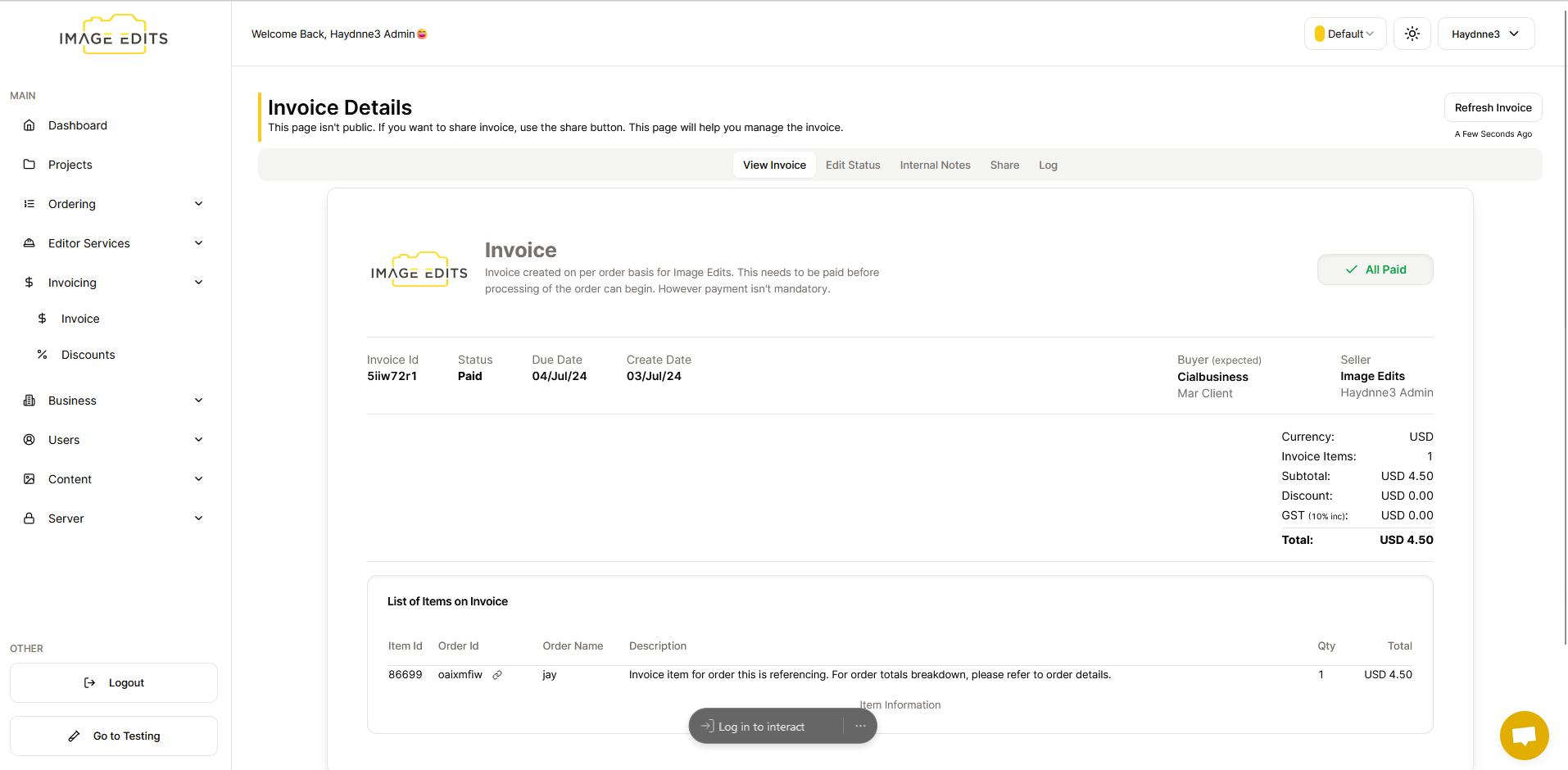
You'll notice there are extra tabs at the top, like editing status and internal notes, these are locked for the invoice creator. These will be useful when we allow you to create invoices for your customers.
Overview of Invoice Layout
-
Invoice Id - This is a unique identifier assigned to the invoice by the management. It helps track and reference the specific invoice among others.
-
Status - This indicates the current stage or status of the invoice in the payment or processing cycle. Current statuses we have are "unpaid", "paid", & "cancelled".
-
Due Date - This is the date by which the payment for the invoice is expected to be made. It serves as a deadline for settling the invoice amount.
-
Creation Date - This refers to the date when the invoice was initially created or generated in the system.
-
Total For Invoice -
- Currency - This is current of the invoice for the buyer is required to pay in. We current support USD, CAD, AUD NZD, GBP, & EUR
- Invoice Items - These are amount of items in this invoice. Invoice items will most commonly refer to orders involved in this invoice. (monthly invoices can have hundreds or thousands of invoice items/orders)
- Subtotal - This is the total amount of all the orders before discounts are applied, and takes into account gst if applicable. (gst is current only for AUD and is including not excluding, so its included in sub total)
- Discount - This is the discount amount that will be minused from the total.
- GST - This is just for AUD currency, other currencies it will be 0. Gst is always inclusive, so its already included in the subtotal, we are just showing it here for what portion of the subtotal is gst.
- Total - This is most importnat value and is what is due on the invoice. This is the subtotal minus the discount amount.
- Note All the totals above, are the sum of the invoice items which will be explained below.
-
Invoice Items - Items generally refers to the orders that are involved in this invoice. However when we allow clients to create invoice for themselves, you'll be able to create whatever items you want, just like creating a normal invoice.
- If the item is a referring to order it will contain the below details:
- Item Id - This is just id for this specific invoice item, not too important for you.
- Order Id - This is the unique identifier assigned to the order by the management. It helps track and reference the specific order among others.
- Link Icon - There will be a link icon next to the id, clicking on it will take you to the specific order.
- Order Name - The name of the order this item is referring too.
- Description - Small description, generally it will just state if you want more specific details of order totals, to view the order directly.
- Qty - This for orders will always be one, as we dont show break down of each specific service in the order, just the total amount for the order. Again after specifics, view the specific order directly.
- Total - This is the total amount for this specific order to be charged to the client.
- If the item is a referring to order it will contain the below details: